S3 Static Website
Production-Ready Static Website Deployment on AWS
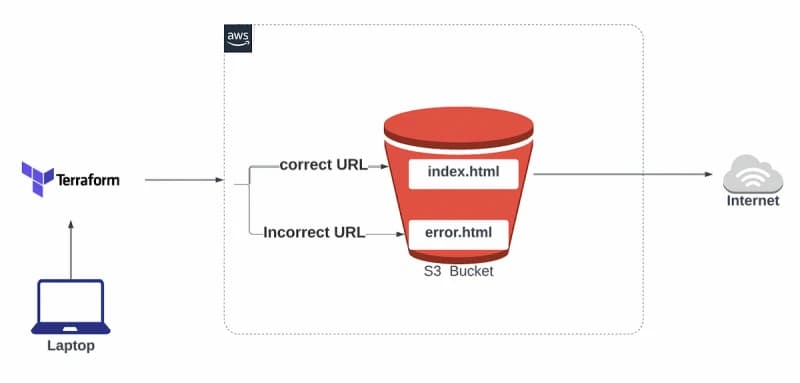
Overview
This project deploys a production-ready static website on AWS S3 using Terraform with fully automated infrastructure provisioning. The setup includes static hosting, public access configuration, encryption, object versioning, and automated file uploads without requiring manual AWS console configuration.
The goal is to create a fast, reproducible, and infrastructure-as-code based static hosting workflow using AWS and Terraform.
Architecture
User → AWS S3 Static Website HostingFeatures
Automated S3 bucket provisioning
Static website hosting
Public read-only bucket policy
AES-256 server-side encryption
Object versioning enabled
Terraform-based deployment workflow
Zero manual AWS console setup
Fast infrastructure provisioning
Tech Stack
Terraform
Amazon Web Services
Amazon S3
One-Command Deployment
git clone https://github.com/shubhammca88/s3-bucket-terraform.git && cd s3-bucket-terraform && terraform init && terraform apply -auto-approve && terraform output website_urlQuick Start
Clone Repository
git clone https://github.com/shubhammca88/s3-bucket-terraform.git
cd s3-bucket-terraform
Configure AWS Credentials
aws configureOr set environment variables:
export AWS_ACCESS_KEY_ID=your_key
export AWS_SECRET_ACCESS_KEY=your_secret
export AWS_DEFAULT_REGION=us-east-1
Initialize Terraform
terraform initPreview Infrastructure
terraform planDeploy Website
terraform applyGet Website URL
terraform output website_urlProject Structure
s3-bucket-terraform/
├── main.tf
├── provider.tf
├── index.html
├── .terraform.lock.hcl
├── LICENSE
└── README.md
Infrastructure Components
S3 Bucket
Unique bucket name generation
Public website hosting
Static asset delivery
Security
Public read-only access
AES-256 encryption enabled
Version-controlled objects
Hosting
index.html homepage
Custom error handling
Website endpoint generation
Update Website Content
terraform applyTerraform automatically detects file changes and uploads updated content.
Required IAM Permissions
s3:CreateBucket
s3:PutBucketPolicy
s3:PutBucketWebsite
s3:PutBucketVersioning
s3:PutBucketEncryption
s3:PutObject
Destroy Infrastructure
terraform destroyResult
Production-ready static website hosting
Fully automated infrastructure provisioning
Secure S3 bucket configuration
Infrastructure managed entirely through code
Fast deployment workflow
Key DevOps Concepts
Infrastructure as Code
AWS automation
Static website deployment
Terraform workflows
Cloud storage provisioning
Infrastructure reproducibility
Final Note
This project demonstrates how static websites can be deployed on AWS S3 using Terraform with a fully automated Infrastructure as Code workflow.
Instead of manually configuring cloud resources through the AWS console, the entire hosting infrastructure is provisioned through code, making deployments faster, repeatable, and production-ready.
More Projects
Explore other projects from my portfolio